QuaddictedTool v2.3.1
A utility for viewing and downloading maps from quaddicted.com.
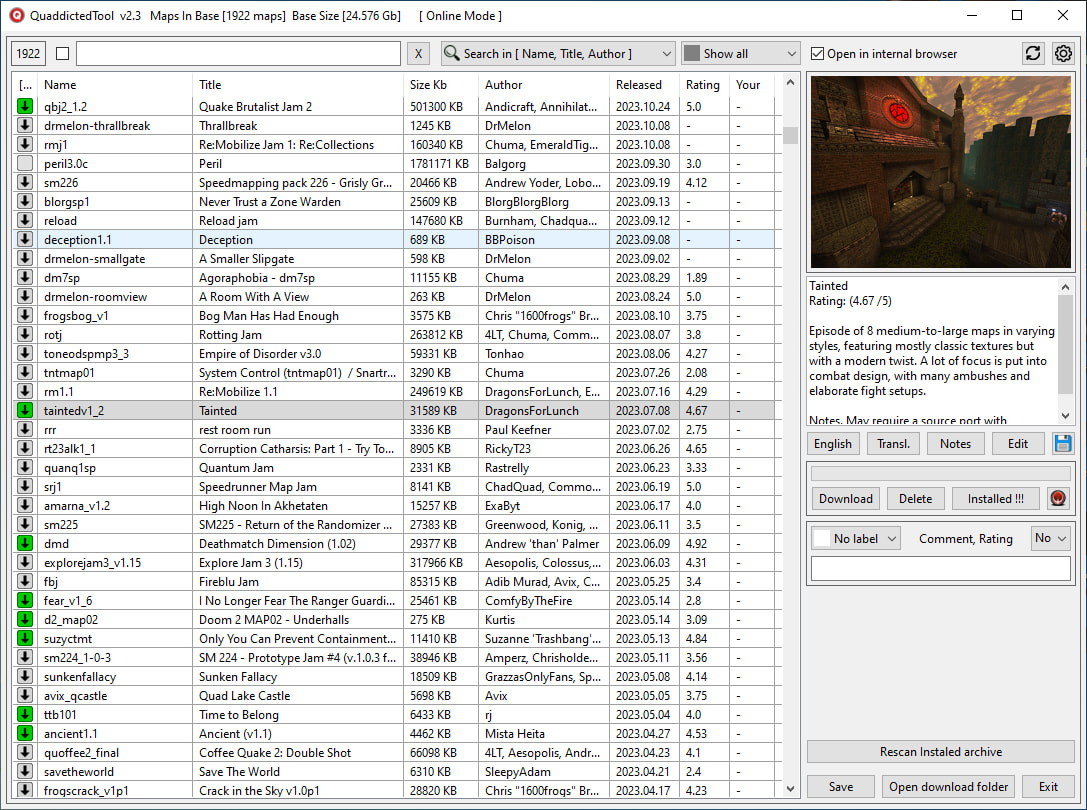
You can add colored labels, comments, your own notes, and your own rating (v2.0+) to each map/mod.
You can sort the database by name, title, size, author, date, and rating.
You can search by name, title, author, and tag (only in v1.2.3 and below). You can search in comments and descriptions.
Automatic translation of map and mod descriptions via Google Translator.
Translation languages: Spanish, Italian, German, Polish, French, Russian, and Ukrainian. If you need to add more languages, please let me know.
When downloading an archive, a screenshot and a text file with a description are added next to it.
When installing such an archive using QMLauncher, the cover art and description are added automatically.
Possibility to quickly install downloaded maps in QMLauncher (v1.4.5+).
If QuaddictedTool is launched from QMLauncher (v1.7.1+), installed archives will be highlighted in green in the left column.
Downloaded archives can be quickly installed in QMLauncher (v1.4.5+).
The path to QMLauncher can be selected in the settings. If the map is already installed in QMLauncher, clicking the "QMLauncher" button will launch QMLauncher and select the map in the list. If the archive is not installed, clicking the "Install" button will launch QMLauncher and begin installing the archive.
There are English and Russian localizations
I am sorry for my English. This is google translate.
Version 2.3
Added icons to indicate downloaded/installed archives (See screenshot).
Corrections have been made to the code to preserve user data (tags, comments, ratings, notes, etc.) when there are errors downloading the database from the Quaddicted website. If you use labels, comments, ratings, notes, etc., I recommend updating the utility to version 2.3+.
To launch the utility without downloading the database from the internet, hold down the Shift or CTRL key while launching.
Several minor fixes.
Installation.
Replace the files of the previous version of the utility QuaddictedTool v2.2.2 with the files from the archive.
Do not install the utility QuaddictedTool v2.3 in the QuaddictedTool v1.2.3 folder!
They are incompatible!
Download link v2.3.1
Download link v1.2.3
 Someone could write backend code to still provide it, I probably would not do it myself. Shouldn’t be too hard but ultimately it will run into problems with releases not being unique by their filenames but hashes instead.