QuaddictedTool v2.3.7
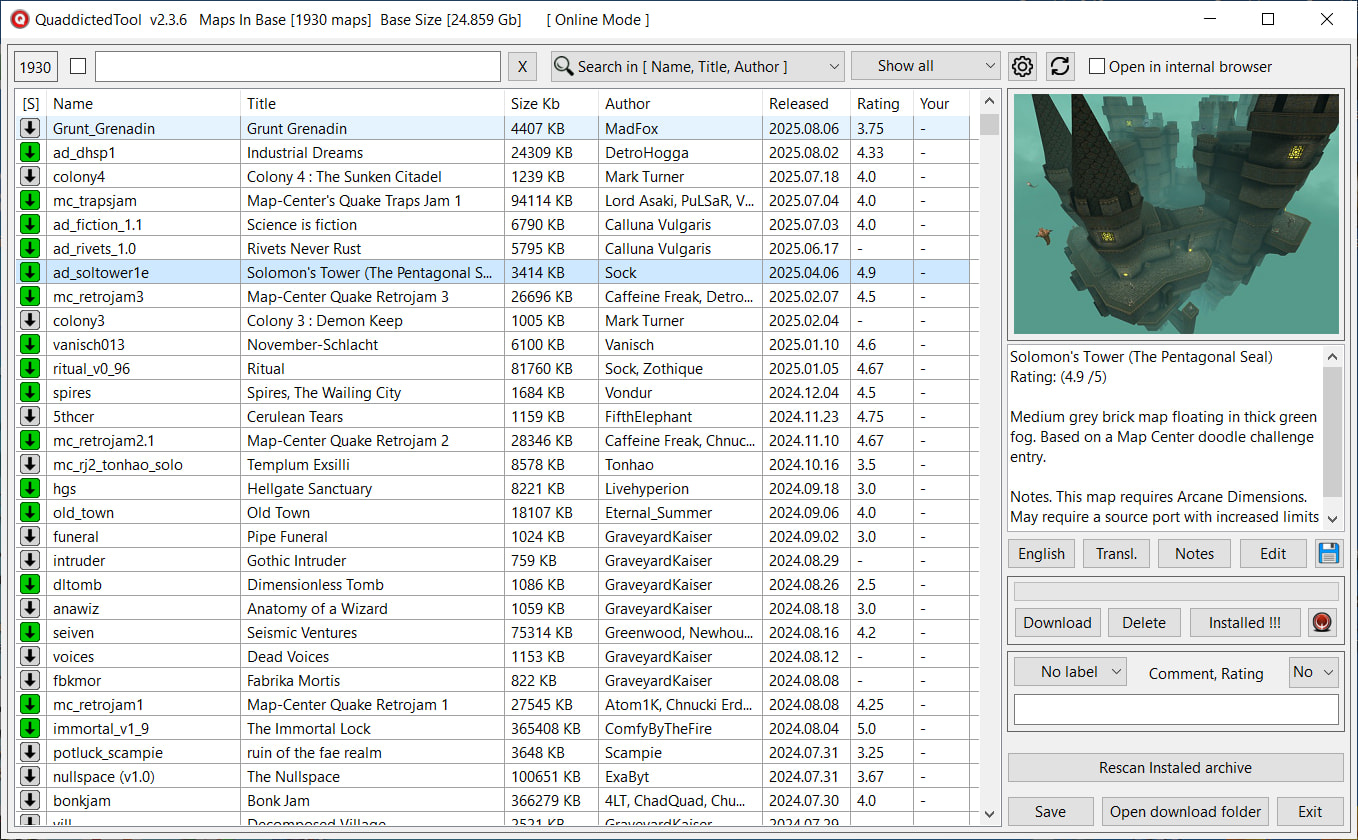
A utility for viewing and downloading maps from quaddicted.com.
You can add colored labels, comments, your own notes, and your own rating (v2.0+) to each map/mod.
You can sort the database by name, title, size, author, date, and rating.
You can search by name, title, author, and tag (only in v1.2.3 and below). You can search in comments and descriptions.
Automatic translation of map and mod descriptions via Google Translator.
Translation languages: Spanish, Italian, German, Polish, French, Russian, and Ukrainian. If you need to add more languages, please let me know.
When downloading an archive, a screenshot and a text file with a description are added next to it.
When installing such an archive using QMLauncher, the cover art and description are added automatically.
Possibility to quickly install downloaded maps in QMLauncher (v1.4.5+).
If QuaddictedTool is launched from QMLauncher (v1.7.1+), installed archives will be highlighted in green in the left column.
Downloaded archives can be quickly installed in QMLauncher (v1.4.5+).
The path to QMLauncher can be selected in the settings. If the map is already installed in QMLauncher, clicking the "QMLauncher" button will launch QMLauncher and select the map in the list. If the archive is not installed, clicking the "Install" button will launch QMLauncher and begin installing the archive.
There are English and Russian localizations
Version v2.3.7
Fixed the broken Google Online Translate feature.
Optimized and accelerated the search for maps/mods in the database.
Fixed the "Cancel" button issue where it failed to respond when downloading the icon cache and offline translation.
Added the ability to set custom images for map screenshots (right-click on the screenshot).
Supported manual screenshot selection or pasting directly from the clipboard.
How to paste from the clipboard:
*1. Select an image file in Windows Explorer and click "Copy" or press CTRL+C.
*2. Copy an image from your browser (right-click the image and select "Copy image").
*3. Copy an image to the clipboard from any image editor or viewer.
*4. In QuaddictedTool, right-click the screenshot and select "Paste cover from clipboard".
Supported image formats BMP, JPG, PNG, TGA.
Fixed various bugs and stability issues.
Installation.
Replace the files of the previous version of the utility QuaddictedTool v2.3.6 with the files from the archive.
Do not install the utility QuaddictedTool v2.3.6 in the QuaddictedTool v1.2.3 folder!
They are incompatible!
Download link v2.3.7
 Someone could write backend code to still provide it, I probably would not do it myself. Shouldn’t be too hard but ultimately it will run into problems with releases not being unique by their filenames but hashes instead.